Halo Campaign Evolved Performance Analysis Reveals Minimal Visual Gain Between Low and Ultra Settings Despite Significant Hardware Demand

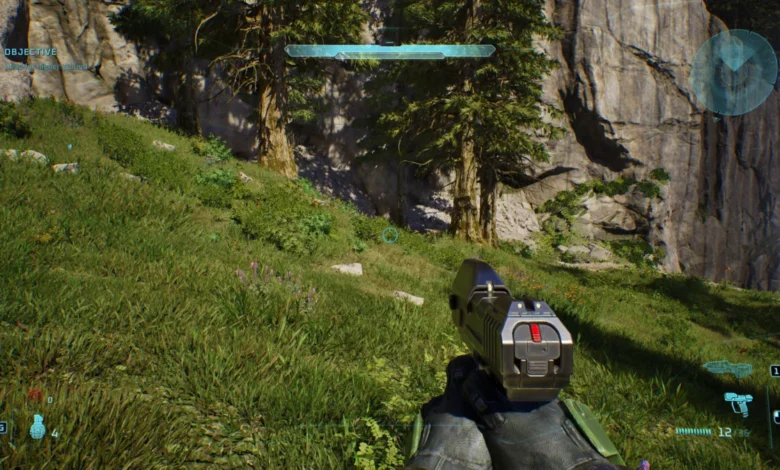
The technical landscape of modern PC gaming often presents a conflict between visual fidelity and hardware efficiency, a reality underscored by recent comprehensive testing of Halo: Campaign Evolved. Detailed performance benchmarks conducted across a diverse range of hardware configurations—ranging from mid-tier legacy systems to cutting-edge enthusiast rigs—indicate that the game’s "Ultra" graphical preset offers diminishing returns. While the "Ultra" setting demands a significant toll on frame rates, often reducing performance by approximately 20%, the visual improvements over the "Low" preset remain remarkably subtle. This discrepancy suggests that for the majority of players, optimizing for higher frame rates and smoother frame delivery may be preferable to chasing the marginal aesthetic benefits of maximum settings.
Core Findings and Graphical Disparities
The investigation into Halo: Campaign Evolved’s graphical scalability reveals a surprising level of visual parity across its presets. In standard gameplay scenarios, such as the opening mission, the differences between "Low" and "Ultra" are nearly indistinguishable to the naked eye. Observers must look for minute details to identify the higher setting, such as slightly more refined user interface elements or marginally softer shadow maps.
Technical analysis identified three primary areas where "Ultra" settings provide a measurable, albeit minor, improvement:
- Foliage Density and Detail: On "Low" settings, certain environmental assets, specifically grass and shrubbery, lose a degree of complexity. Some finer details are culled to save on geometry processing, though the impact on the overall atmosphere is negligible during high-speed combat.
- Lighting and Specular Highlights: In interior environments, particularly within the Covenant-inspired spaceship levels, the "Ultra" preset allows light to interact more realistically with metallic surfaces. Weapons reflect ambient light with greater accuracy, and the transition between light and shadow appears more natural.
- Shadow Softness: Shadows on the "Low" preset tend to have harder, more aliased edges. Moving to "Ultra" introduces softer shadow filtering, which reduces the "shimmering" effect often seen in complex environments, though this is primarily noticeable during static observation rather than active movement.
Despite these refinements, texture quality for blood, debris, and character models remains largely consistent across presets, suggesting that the game’s core assets are well-optimized even at lower settings.

Quantitative Performance Data Across Hardware Tiers
To understand the practical impact of these settings, the title was tested on four distinct desktop configurations and a high-end handheld device. The results demonstrate that while high-end hardware can "brute force" the Ultra settings, the performance cost remains constant across the board.
Desktop Benchmarking Results (1440p Native Resolution)
The following data represents performance on the "Low" preset at a native 1440p resolution, which serves as the baseline for high-performance play:
- Rig 1 (Mid-Tier): Featuring a Ryzen 5 5600X and an NVIDIA RTX 3070 with 32 GB of RAM, this system achieved an average of 51 FPS with 1% lows of 45 FPS. On this hardware, moving to Ultra settings would likely push the game below the 60 FPS threshold, making the Low preset a necessity for fluid gameplay.
- Rig 2 (High-Mid): Utilizing a Ryzen 7 7800X3D and an NVIDIA RTX 4070 Super, this configuration delivered a robust 74 Avg FPS and 55 1% Lows. This rig represents the "sweet spot" for 1440p gaming, though the 20% performance hit of Ultra settings would bring it dangerously close to 60 FPS, potentially introducing stutter during intense combat sequences.
- Rig 3 (Enthusiast): Equipped with the next-generation NVIDIA RTX 5080 and a Ryzen 7 7700X3D, this beastly rig pushed 118 Avg FPS with 100 1% Lows. While this system can easily handle Ultra settings at over 90 FPS, the testing suggests that the extra frames provided by the Low preset are more beneficial for high-refresh-rate monitors.
- Rig 4 (AMD Enthusiast): Built around the AMD RX 9070 and a Ryzen 7 7700X3D, this system produced 101 Avg FPS and 90 1% Lows. The performance delta between the RTX 5080 and RX 9070 highlights the title’s heavy reliance on raw rasterization power.
The Impact of Upscaling Technologies
A critical component of the Halo: Campaign Evolved experience is the implementation of Deep Learning Super Sampling (DLSS) and FidelityFX Super Resolution (FSR). The testing found that the performance cost of graphical presets varies depending on the upscaling mode selected.
When upscaling is set to "Low" (which typically involves rendering at a significantly lower internal resolution, such as 33%, and upscaling to the target), the FPS difference between the Low and Ultra graphical presets becomes negligible. In this specific scenario, players are encouraged to use Ultra settings, as the hardware overhead is already mitigated by the lower render resolution. However, when using "Ultra" upscaling (which prioritizes image quality), the 22% performance dip when switching to Ultra graphics returns, making the Low graphics preset the more logical choice for maintaining high frame rates.
Handheld Optimization: The ASUS ROG Ally X Case Study
The rise of portable gaming PCs has introduced a new tier of optimization requirements. Halo: Campaign Evolved includes a "Very Low" preset specifically designed for these power-constrained devices. Testing on the ASUS ROG Ally X at 1080p reveals that upscaling is mandatory for a playable experience.

Performance on ASUS ROG Ally X (Very Low Preset):
- FSR Low: 49 Avg FPS / 39 1% Lows
- FSR Medium: 43 Avg FPS / 34 1% Lows
- FSR Ultra: 33 Avg FPS / 27 1% Lows
- FSR Native: 22 Avg FPS / 19 1% Lows
Alternative upscaling methods, such as Temporal Super Resolution (TSR), showed more consistent but generally lower performance, with TSR Native dropping to a mere 20 Avg FPS. For handheld users, the recommendation is clear: utilize the "Very Low" setting in conjunction with FSR set to "Medium" to achieve a balance between visual clarity and playable frame rates.
Chronology and Development Context
The release of Halo: Campaign Evolved marks a significant milestone for Halo Studios (formerly 343 Industries). This version represents a continued effort to modernize the foundational Halo experience for a contemporary PC audience. Historically, the Halo franchise has had a complex relationship with the PC platform.
- 2001-2003: The original Halo: Combat Evolved debuted on Xbox, followed by a Gearbox-developed PC port that was criticized for certain graphical inaccuracies compared to the console original.
- 2014-2020: The Master Chief Collection (MCC) brought the series back to the forefront, eventually migrating to PC with enhanced resolutions and frame rates.
- Present Day: Halo: Campaign Evolved appears to be an evolution of these efforts, utilizing modern engine features to provide a "definitive" campaign experience. However, as the testing shows, the inclusion of high-end graphical toggles does not always equate to a transformative visual experience, reflecting a broader industry trend where the "Ultra" preset is often an inefficient use of resources.
Expert Analysis and Technical Recommendations
From a journalistic and technical perspective, the optimization of Halo: Campaign Evolved suggests a philosophy of "high-floor, low-ceiling" graphical design. By ensuring the game looks excellent at "Low" settings, the developers have made the title accessible to a wide range of hardware. However, the lack of a "wow factor" at "Ultra" settings may disappoint those who have invested in top-tier GPUs like the RTX 5080.
The most significant takeaway for the player base is the importance of manual settings adjustment. Beyond the Low/Ultra debate, testing highlighted that certain post-processing effects, such as motion blur, significantly detract from the visual clarity of the game. Disabling motion blur is recommended regardless of the hardware being used.

Furthermore, the data suggests that "Native" resolution at "Low" settings almost always provides a superior visual and gameplay experience compared to using "Medium" or "High" upscaling on "Medium" settings. The clarity of a native pixel grid outweighs the marginal improvements in shadow softness or foliage density offered by higher presets.
Broader Implications for the PC Gaming Market
The performance profile of Halo: Campaign Evolved is indicative of the current state of PC game development. As developers target a wide range of devices—from the Steam Deck and ROG Ally to the RTX 50-series—the "Ultra" preset is increasingly becoming a "future-proofing" toggle rather than a setting intended for contemporary play.
This "20% tax" for "Ultra" settings without a corresponding 20% increase in visual quality is a pattern seen in several recent AAA releases. It underscores a shift where "Low" settings no longer mean "poor quality," but rather "optimized quality." For the consumer, this is a positive development, as it extends the lifespan of mid-range hardware. For the enthusiast, it serves as a reminder that the most expensive hardware is best utilized for pushing higher resolutions (4K) or higher frame rates (144Hz+) rather than simply maxing out every available slider in the options menu.
In conclusion, while Halo: Campaign Evolved is a technically competent release, its graphical presets require careful navigation. For the vast majority of the PC gaming community, the "Low" preset offers the most balanced experience, preserving the iconic aesthetic of the Halo universe while ensuring the high-speed, responsive gameplay that the franchise is known for.
Related posts: